Send
The MLMRC eBooks to Each of Your Downline:
( Just
1 email, 1 click)
 Click
here
Free
MLM Memory Jogger prospecting workbook
Click
here
Free
MLM Memory Jogger prospecting workbook
Click
here
how
to get unlimited free warm mlm leads off Google.
workbook
(You're
allowed to share any ebooks you downloaded in
the Members Area with your downline)
Gmail
instructions here: Other email accounts like
"hotmail" or "aol" see further
BELOW
STEP
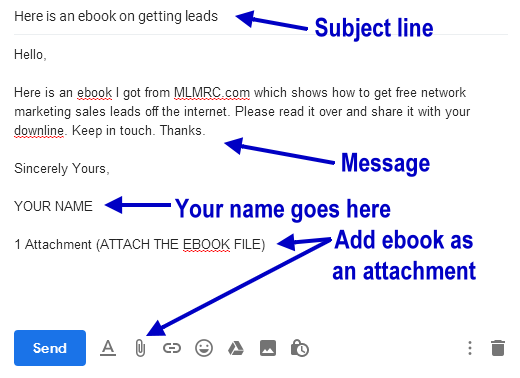
1) Click "Compose". Then enter an
email that would look similiar to the following:
STEP
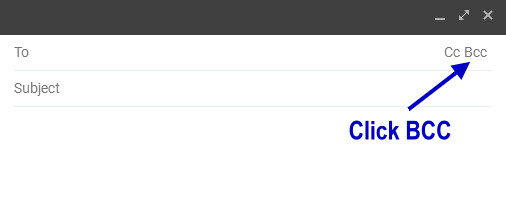
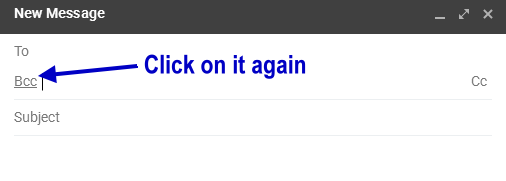
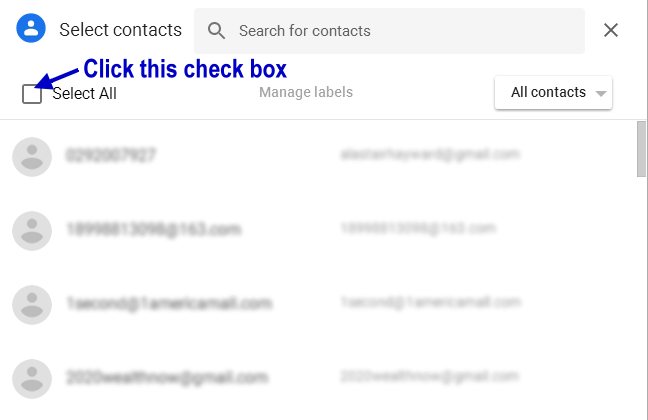
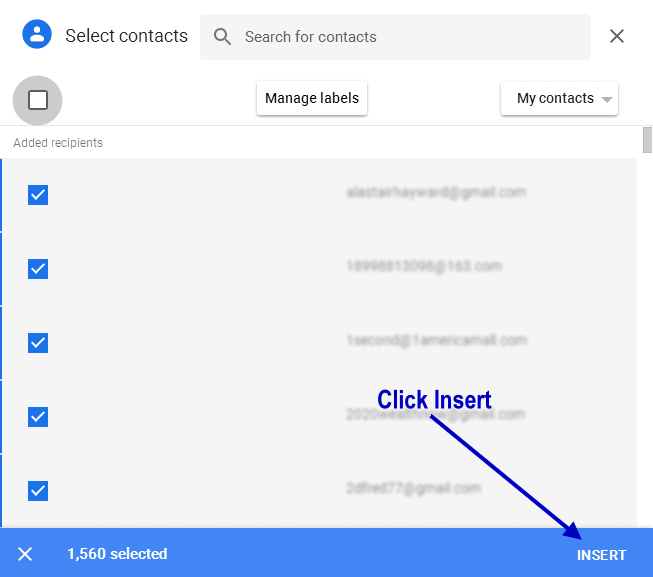
2) Click "BCC". Then enter an email
that would look similiar to the following:

STEP
3) Click "to". Then enter : Your
own email address (as if you'd be sending it to
yourself)

STEP 4) Click send

SENDING
TO JUST YOUR MLM CONTACTS OR DOWNLINE:
Step
1: Open
your Gmail, hotmail, or email account
Step
2: Open
notepad
Step
3: copy
all the emails of your downline that you plan
to send the course to. One email per line.
Step
4: When
you've created your list, next click "compose"
in Gmail as if to create a new email message.
Step
5: In
the "to" field, type in your own email
address.
Step
6: Click
where you see it says "BCC", that brings
up a new field (in gmail) or in some other email
services it just has it as a line that you can
enter emails into. Now copy the list of your emails
that you're going to send to. And paste those
into the BCC field. So when you send off this
email, the email program sends you a copy, and
each of the emails you put into the BCC field.
Step
7: Now
look for where it says "attachment"
or look for the paperclip icon. Click that. Chose
the course PDF file from your computer. Add that
to the email. Or just send them the link to where
to download it.
Step
8: When
you fill out the subject line, just put something
very basic, I suggest something like "hi
it's me" or "how are you". Whatever
do you do not say "MLM, or Network
marketing, or free or course", also when
you're writing your email to them just say something
basic. (when it's ready click "send"
which will send a copy of the file to each of
your downline with 1 click).
Like
THIS: "I've
attached some very helpful training. Be sure to
open that item attached as it will give you a
lot of addition instruction on how to go about
building your team."
Words
to avoid saying are things like: Free,
MLM, Network Marketing, Upline, Downline, or anything
MLM related.
The
reason is that Gmail and other email programs
might send the email to the persons junk mail
if they see any of those words in the "subject
line" or in the "body copy." So
that's why I'm saying when you're describing the
item to your downline, don't go into a lot of
detail, and don't use any words that might trigger
the spam filters or your downline won't likely
ever see the course.
Step
9: Follow up with each of them within a day
or two. If you have a really large downline then
you can repeat the process to contact them all
at once. Just do the same process of setting up
the email using the BCC. Then send them a follow
up email saying "hey did you get that attachment
I sent the other day to help you grow your business?"
or something like that.
(or)
if you have all of your downline listed on some
other system, ie: social media or whatever that's
another simple way to find out if they received
the item. So you could also just post to your
facebook, something like:
"I
sent each of you in my XXXXX company downline
a training course that I got from MLMRC.com. The
course should be in your email account it's label
MLMRC Free Course. You should have received that
by now. If you didn't contact me and or check
your promotions folder as well."
The
End.
(if
you're not sure how you got to this page, and
you're wondering about what MLMRC is all about?,
click here
now)
|
Share
Us: Please help us spread the word
about this opportunity. Share it now:
|
OTHER:
Click
here
to see
our fully automated downline building system now!
Click
here
to Discover
an easy way to earn Cryptocurrency
Click
here
Free
MLM Memory Jogger prospecting workbook
Click
here
to enter
to win a FREE $50 dollar Amazon Gift Card
Click
here
Join
our MLM Pre-Launch

 ..
.. ..
.. ..
..